Security features
We want you to feel as safe and comfortable as possible on Fotolikein. To do this, we have provided simple ways and means of ensuring security that you can manage and configure as you wish. This guide will help you understand how to find and use the security and privacy management tools available on Fotolikein.

Reporting inappropriate content or behavior and blocking users
Sometimes all you need is to give a signal. That's why it's very easy on Fotolikein file a complaint. Moreover, another user will not know that you are the author of the complaint.
After sending the complaint, Fotolikein moderators will check it and take appropriate measures. To find out which content will be removed from Fotolikein, read our Community recommendations.
Fotolikein provides several ways to inform us about inappropriate content:
1) Complain directly from the user's news feed or profile page. To do this, click on with three dots, located above the message you want to complain about. You will need to choose the reason for the complaint. This will help Fotolikein moderators better understand what is wrong with this message and choose the necessary measures (for example, delete the message or even temporarily block the user who posted it).

2) Complain or block the profile. Click on the three dots on the user's profile page. This way you can send a complaint against the user or block him.
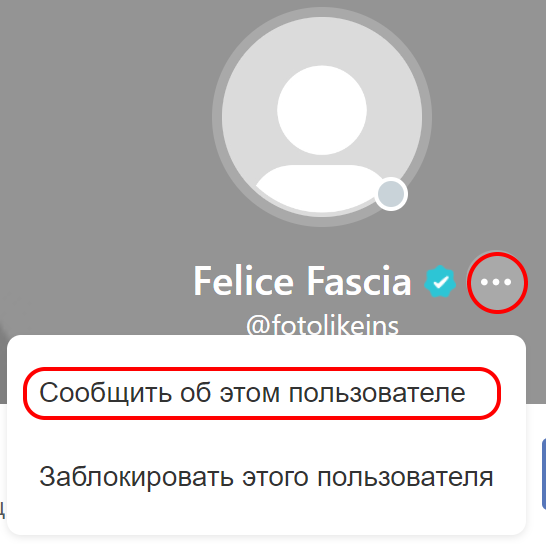
Ensuring your safety is a top priority for the Fotolikein team. Remember that if you feel uncomfortable, you can always complain about a message or user and/or block it.
Content Management on Fotolikein
You are the editor-in-chief of the content that you see on Fotolikein and post yourself.
1) Your profile. You decide for yourself what your subscribers will see. All publications posted on the site are publicly available, so think twice before publishing anything. Remember that you can always delete any entry from your profile.
Privacy on Fotolikein
All information that you post on Fotolikein is public. This means that anyone has access to all the content posted on Fotolikein. Your posts are visible to all users and visitors of the site, and can also be found through search services such as Google. Therefore, when publishing your photos and other recordings, be especially careful if you do not want the whole world to know any information about you!
Despite the fact that your profile on Fotolikein is public, you can take care of maintaining your privacy:
1) Real name. Don't you want your profile to be found on Google by your name? Then use a nickname instead of your real name.
2) Personal information. Never post personal information in your messages, such as your address or phone number!
3) An opportunity for other users to subscribe to your updates. Other users can subscribe to your actions on the site, upload a new profile photo, or change their mood or status. To disable this feature, uncheck the "Allow others to subscribe to my updates" option in the Settings section.
4) Posting a post by mistake. If you posted a post by mistake, you can edit it from your profile by clicking on the three dots above the message.
5) You can also delete your account. In this case, all information will be completely deleted from Fotolikein servers. To learn more about how to permanently delete an account, click here.
Brief reminders about the features of using Fotolikein
To make your impressions of using the Fotolikein website as positive as possible, keep in mind the following simple rules:
- Be attentive to what you post. To find out what is allowed and what is forbidden to do and post on the site, check out our Community recommendations.
- If you notice offensive behavior on Fotolikein, let us know! Use the opportunities to complain about any inappropriate or offensive content so that we can immediately take the necessary measures (for example, send a warning or block the user). You can also contact Fotolikein support service.